CentOS Configuration
Basic Info Checks
script
Set up Networks
scriptvi /etc/sysconfig/network-scripts/ifcfg-xx
|
Config as below
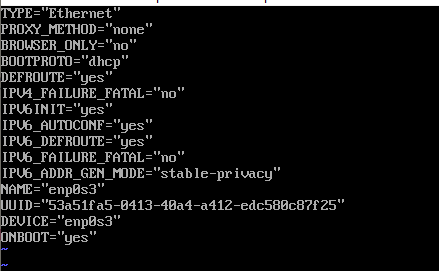
Then restart the network service
script
script
Install pre-requisite packages
scriptyum install -y gcc gcc-devel gcc-c++ gcc-c++-devel make kernel kernel-devel bzip2
|
Install Python
scriptyum install openssl-devel bzip2-devel expat-devel gdbm-devel readline-devel sqlite-devel mysql-devel gcc gcc-devel python-devel
|
- In CentOS Python 3.7 above will report No module named ‘ctypes’
script
Download
scriptyum install wget
wget https://www.python.org/ftp/python/3.8.2/Python-3.8.2.tgz
|
Unzip
scripttar -zxvf Python-3.8.2.tgz
|
Config Python 3.8
scriptmkdir ~/app/python3
cd Python-3.8.2.tgz
./configure --prefix=/root/app/python3
make && make install
|
Add to .bash_profile
script
in .bash_profile add below
script# Python
export PYTHON_HOME=/root/app/python3
export PATH=$PYTHON_HOME/bin:$PATH
|
exit, the reload
script
Install MySQL
scriptyum remove mariadb-libs.x86_64
|
- download and install mysql repo
scriptwget https://repo.mysql.com/mysql57-community-release-el7-8.noarch.rpm
yum localinstall mysql57-community-release-el7-8.noarch.rpm
|
scriptyum install mysql-community-server
|
- Check if mysql is started
script
if mysql is not started run
script
scriptcat /var/log/mysqld.log | grep "password"
|
script
scriptSET PASSWORD = PASSWORD("abc123");
|
scriptset global validate_password_policy=0;
set global validate_password_length=1;
|
close firewall
script
allow remote access
scriptupdate mysql.`user` set Host='%' where User='root' and Host='localhost';
flush privileges;
|